
Procedure sheets · GANTT · Field work
Photograph. Annotate. Plan.
Procédé turns your photos into clear procedures. Use your photos to generate a prefilled, color-coded GANTT that stays in sync with your photo edits. Procédé works on your phone, tablet or computer, even without internet.
Free account, no credit card.
- Works offline
- Hosted in Canada
- Word · PDF · Excel
- French & English
The edge nobody else has
A GANTT that follows your sheets.
In color. All by itself.
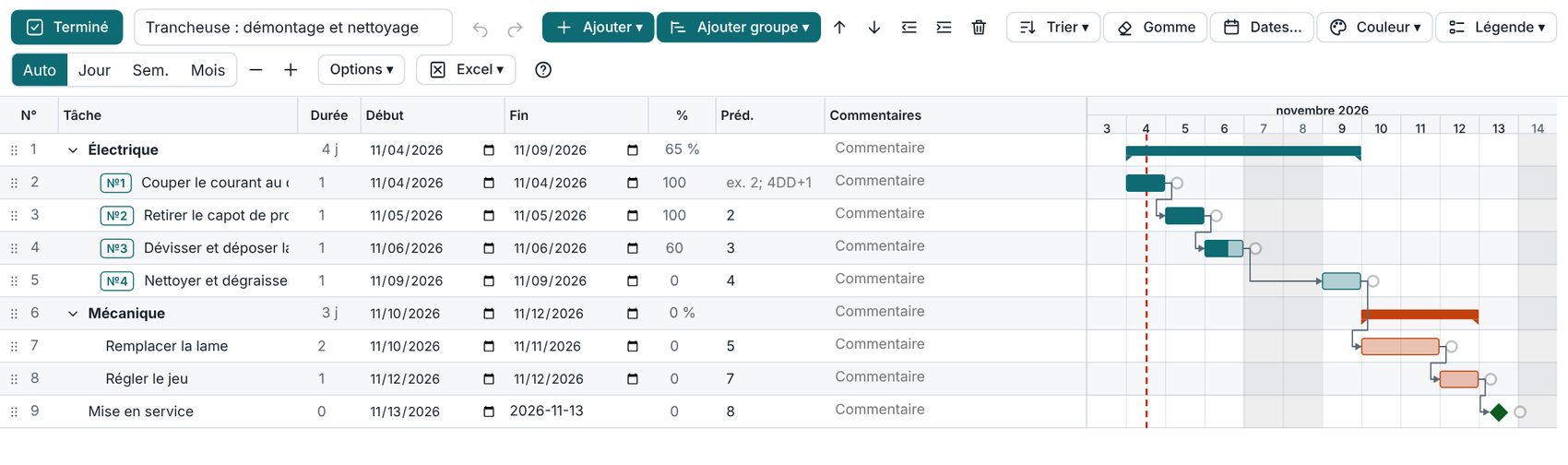
Your photo steps become a project plan, and every task stays linked to its photo, its text and its color. You edit the document: the GANTT updates.
Color code by group
Group your blocks in the document (“Electrical”, “Mechanical”). One click imports them: each group becomes a GANTT group, in its color.
Automatic sync
Block 83 becomes 84? The task follows. You add a block to a group? It arrives in the GANTT, highlighted, ready to validate.
The photo, one click away
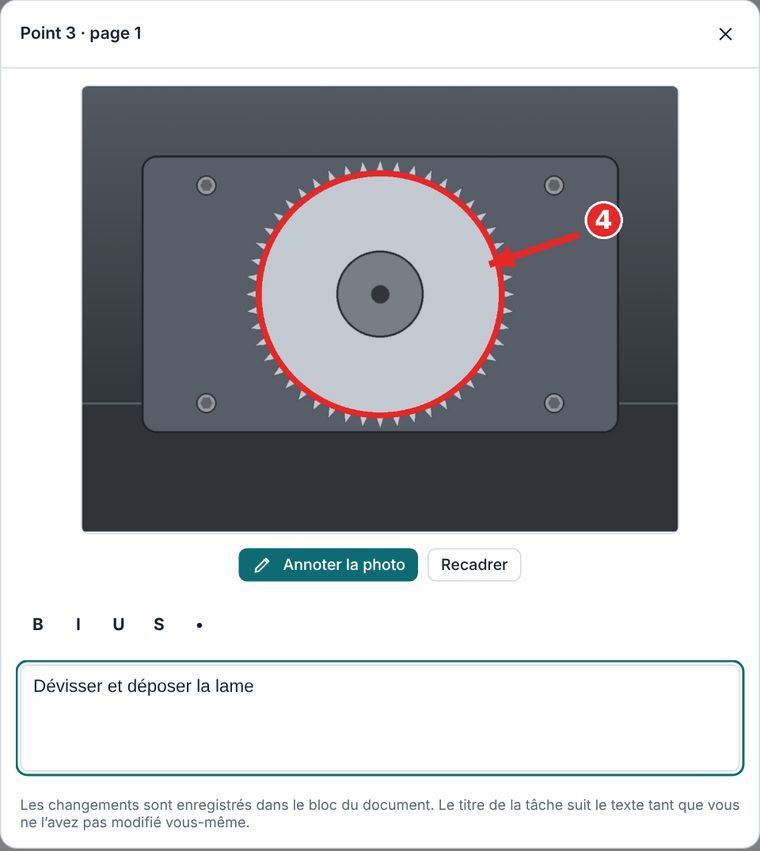
Open a task’s block: annotated photo and text, editable in place. The task title follows the block’s text.
The document
The GANTT
You add a block in the document, it appears in the GANTT, in its group and its color.
New · 2D/3D plans PRO
A simple plan, to scale,
right inside your document.
Draw lines, zones, walls and volumes, with their measurements. The plan appears on the sheet like a GANTT, can be shared, and each 3D view can become a photo in a block.
2D or 3D, inches or cm
Pick the mode and the unit; conversion is automatic as you draw. Snapping to the grid, to points and to 15° angles, length typed on the keyboard, print scale (1:50, for example).
“Leader” measurements
Each measurement is linked to its element by a floating line that follows the plan when you rotate it in 3D. Can be turned off. Snapping to corners, midpoints and existing lines.
Shapes and volumes
Lines, rectangles, circles, zones, walls, boxes, extrusions, cylinders, dimensions and annotations, with your choice of colors and thicknesses. A photo or scanned plan can serve as a background, calibrated to scale, and every object moves along its X, Y and Z axes.
Plan photos
Move the plan inside the capture box, click “Capture”, then “Done”. Each capture goes into a block. On export, the sheet keeps the last position or asks you to take photos.
Sharing and groups
A reader sees and rotates the plan; a contributor can edit it. A plan can belong to one or more groups, and can be exported on its own (PNG, SVG, PDF, DXF) or with the document.
Included in the Pro and Enterprise plans, for the “complex project” and “documentation only” types.
In action
From photo to GANTT,
in five steps.
Take a photo, file it in a group, give it a color: the GANTT builds itself and each task keeps direct access to its photo.
A real planning tool
Not a bar drawing: a complete GANTT
- Dependencies and critical path, milestones, subtasks, progress percentage and today’s date.
- Group start and end editable : the document’s tags adjust to the nearest position.
- Sort by group, then by remaining tasks and milestones. Bulk date shifting.
- Day, week or month scale, color legend, columns of your choice.
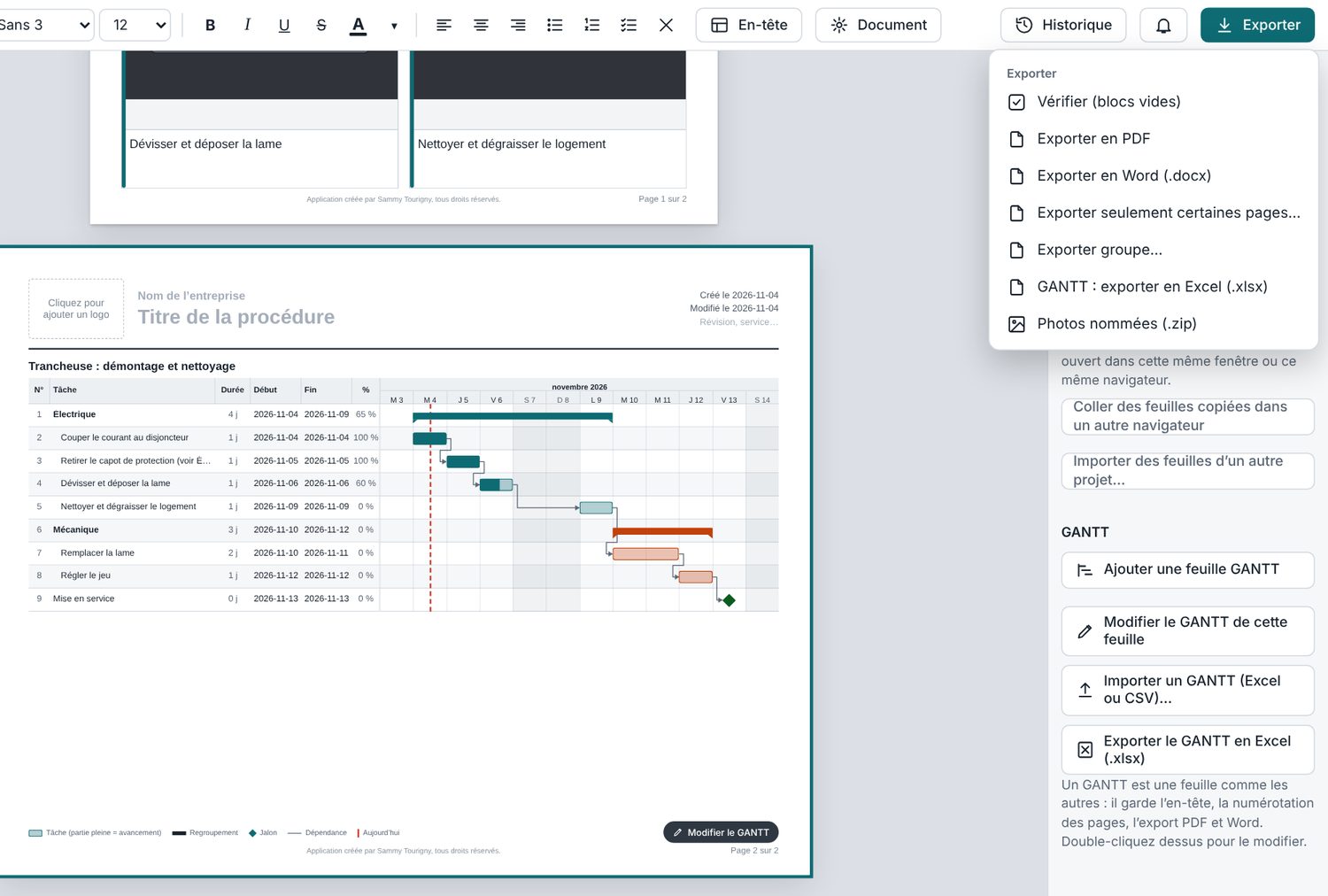
- Excel or CSV import, Excel export (.xlsx).
- Printed with the sheet : same header, same pages, same PDF and Word exports.
From the field to the sheet
Three steps, one sheet
No training needed: take photos, write one sentence per step, export.
- PhotographTake photos in the app or import those from your phone. The date, place and device are saved with each photo.
- DescribeOne sentence per step. Add arrows, numbers and text directly on the photo.
- ExportProcédé numbers and lays out the pages. Word, PDF, Excel for the GANTT, named photos: ready to print.
Automatic layout
Add a step. Everything readjusts.
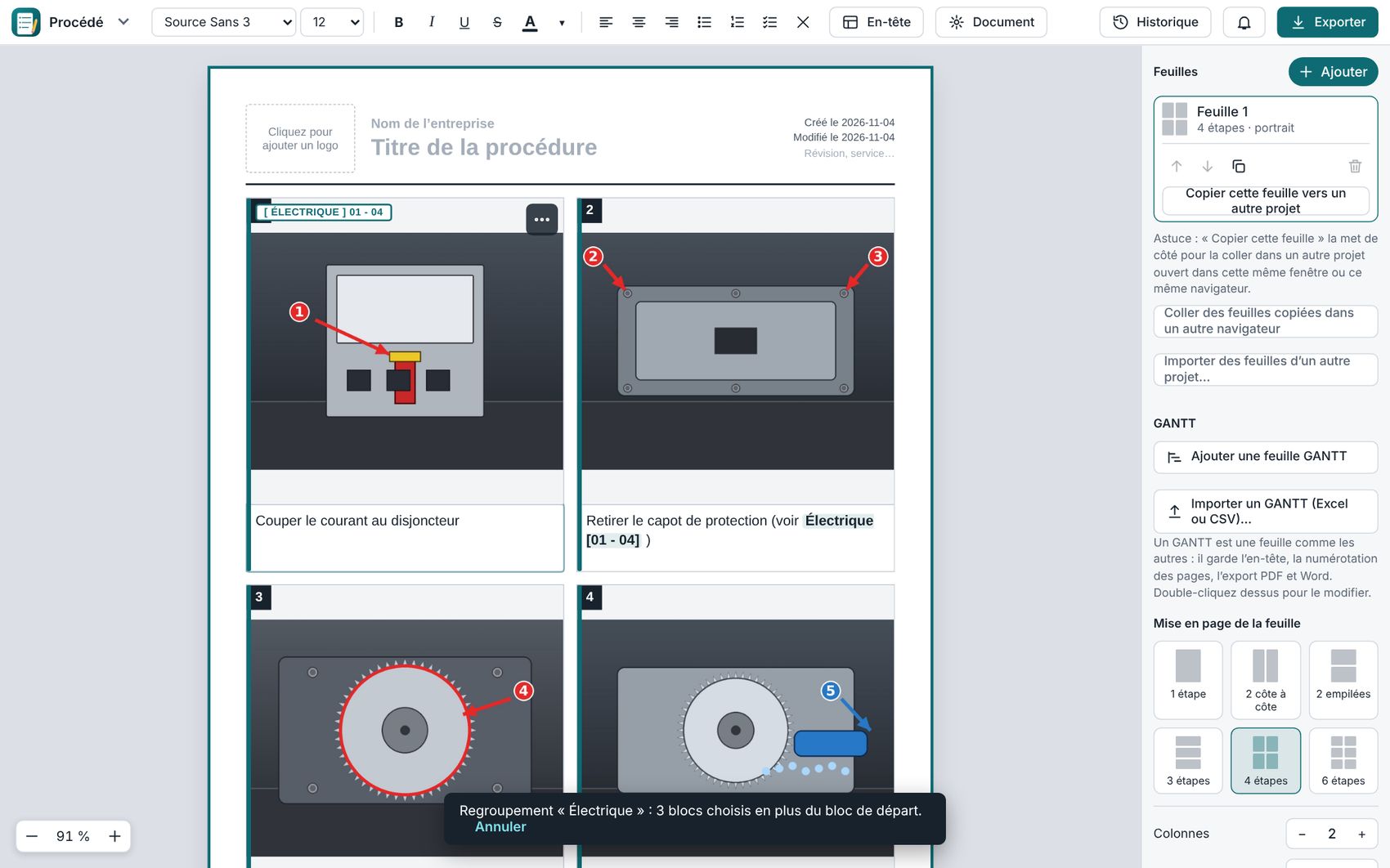
- Numbering and pages that follow every block you add, remove or move.
- Layout of your choice : from 1 to 6 steps per page, portrait or landscape, adjustable columns.
- Groups and tags : write [Electrical] anywhere, the range [01 - 04] appears and updates on its own.
- Import and export by group : a whole Word file into one group, or only that group on output.
- Custom header : logo, “operating procedure” table, automatic dates, saved templates.
Everything you need on the floor
Built for work sheets, not for offices
Cleaning, disassembly, start-up, inspection, training, project follow-up. See the tutorial.
Annotated photos PRO
Arrows, lines, circles, rectangles, freehand, text and numbers, with cropping and rotation. The original is kept under the annotated version.
Built-in camera
Take the photo in the app, on all your devices, or import several at once.
Where, when, which device
Every photo taken carries its date, time, position (if you allow it) and device. Optional caption and EXIF data in exported JPEGs.
Customization PRO
Headers, app colors, font and size, captions under photos, light or dark theme.
Import and export
Word (import and export), PDF PRO, Excel for the GANTT, named photos (.zip) and a .procd file that opens without an account.
Offline, installable
Installable app. Automatic saving on every change, even in a production room with no network.
Synced cloud PRO
Your projects follow you across all your devices and resync when the network returns. Two people on the same project: no version is overwritten.
History and undo
Undo, redo, change history for each sheet, empty-block check before export.
Procédé Enterprise
Everyone sees what concerns them. Nothing goes out without approval.
Your procedures are organized by department. An administrator approves, readers only see what is validated, and every action leaves a trace.
Departments = folders
Production, Sanitation, Maintenance, Engineering… Each department is a restricted-access folder, reserved for its members.
Change approval
Draft, review, approved. An author who edits an approved project automatically puts it back in review. The approver sees who changed what, before and after.
Audit log
Creation, editing, moving, deletion, approval, invitations, removals: everything is recorded, kept for 3 years and provided on request.
Precise roles
Super-administrator, department administrator, author, reader. Each manages their own department, nothing more.
Controlled invitations NEW
An administrator invites by email, the person creates their password, then an administrator approves. Invitations can be limited to the company’s domain (@your-domain.ca).
Rules enforced by the database
Valid subscription, company membership, department access, project status: the rules are checked on the server, not only on screen. Two-factor authentication available.
Who can do what
| Role | Sees | Can |
|---|---|---|
| Super-administrator | All departments and projects, the whole log | Create departments, appoint administrators, invite and remove people, approve, delete projects |
| Department administrator | Their department, their log | Approve and edit, assign author and reader roles in their department. Cannot delete |
| Author | Their department | Create and edit projects, send them for review |
| Reader | The approved projects of their department | View approved projects |
Let’s talk about your team
Pricing is set by written quote: it depends on the number of users, the development needed and the number of sites, with a possible discount for several plants. Write to us: we’ll schedule a short meeting.
For teams that must do things right, and prove it
Wherever a repeated task must be done the same way, by anyone, and shown in photos: Procédé replaces scattered Word files with clear, approved and traceable procedures.
Food processing
Sanitation, disassembly and equipment-cleaning sheets, standard operating procedures (SOPs), production staff training.
Plants and manufacturing
Work instructions, start-up, changeovers, inspections, with photos of each step.
Maintenance and upkeep
Disassembly, lubrication, parts replacement, lockout sheets per machine, viewed by technicians on a tablet.
Pharmaceutical, cosmetics, laboratories
Operating procedures, equipment cleaning, shift instructions, with approval by a manager before release.
Warehouses and logistics
Receiving, storage, loading, operation of handling equipment, visual safety instructions.
Institutional kitchens and lodging
Hygiene and sanitation, equipment maintenance, housekeeping protocols, onboarding of new employees.
Don’t see your industry? If you have tasks to document step by step, Procédé adapts.
The documentation requirements Procédé helps you meet
Most quality, food-safety and safety standards ask for the same thing: written, up-to-date procedures, approved by the right person, available to those who need them, with a trace of what changed. That is exactly what Procédé does.
| Standard or framework | What it requires | What Procédé provides |
|---|---|---|
| ISO 9001 (quality), clause 7.5 | Documented information created, updated and controlled | Approval before release, readers limited to approved versions, change history |
| ISO 45001 (occupational health and safety) | Work procedures and documented information available to workers | Visual sheets viewable on the floor, access by department |
| ISO 14001 (environment) | Documented operational control | Approved and traceable procedures |
| HACCP, Safe Food for Canadians Regulations (SFCR), SQF, BRCGS, FSSC 22000 | Written, applied and verifiable hygiene and sanitation procedures, evidence of document control | Sanitation procedures in photos, manager approval, audit log kept for 3 years |
| Good Manufacturing Practices (GMP) | Written, approved procedures whose changes are traced | Mandatory approval step, detail of who changed what |
| Lockout : Regulation respecting occupational health and safety (Québec), CSA Z460 | A written lockout method for each machine, available to workers | One sheet per machine, with photos of the isolation points, approved and up to date |
| Law 25 (personal information protection, Québec) | Protection, traceability and access to personal information | Data hosted in Canada, role-based access, two-factor authentication, log provided on request |
Procédé is a procedure-management tool. It is not itself certified and does not replace your management system or your auditors: compliance depends on how your company uses it. The exact requirements are those of your standards and regulations.
Simple pricing
Start free. Pro for one person, Enterprise for a team that needs to organize and approve. Cancel any time.
Pro
Also available at $200 per year.
- Everything in the free plan
- Photo annotation, cropping and rotation
- Customizable headers and colors
- PDF export and named photos
- Scaled 2D/3D plans, shareable
- Bulk import, free layouts, unlimited pages
- Your projects in the cloud, on all your devices
Enterprise
Based on the number of users, the development needed and the number of sites (possible discount for several plants).
- Everything in Pro, for the whole team
- Restricted-access departments
- Roles: super-administrator, administrator, author, reader
- Project approval and readers limited to approved versions
- “View folders” and “View members” in the app
- Activity log
- Invitation by an administrator, then approval of each signup
- Change history for each sheet
The Pro plan is activated from the app, after creating an account. Payment by card, cancellation at the end of the paid period. The Pro plan is for one person: organization into departments is reserved for the Enterprise plan.
Frequently asked questions
Can I make plans in Procédé?
Yes, with the Pro and Enterprise plans: 2D or 3D plans (simple volumes) in inches or centimeters, with scale, measurements, zones and annotations. The plan appears on the sheet, can be shared read-only or editable, and its captures go into your blocks. The 3D is an axonometric view (no perspective), designed for simple plans, not to replace CAD software.
What makes Procédé’s GANTT different?
It is linked to your sheets. Each task keeps its block number and opens its photo and text. The document’s groups give the GANTT its colors, and a block that is added or renumbered carries through without redoing the plan.
Are my projects safe?
Your projects stay on your device first. If you use the cloud (Pro and Enterprise plans), they are sent to servers hosted in Canada, separated by company. Procédé uses no advertising and no tracking of your behavior.
Can I cancel my subscription?
Yes, at any time, from the app. Cancellation takes effect at the end of the period already paid. Your data stays readable and recoverable.
Does Procédé guarantee that my procedures are compliant?
No. Procédé is a formatting and management tool: you remain responsible for the content of your sheets, and they must be validated by a competent person before use.
What happens if I lose internet?
Nothing: the app runs on your device, saves on every change, and the cloud syncs when the connection returns.
Do photos keep their date and place?
Photos taken in the app carry the time, position (if you allow it) and device. This data is used for captions, export file names and the EXIF data of exported JPEGs.
Your next procedure, ready in minutes.
Create a free account, take three photos, and watch the sheet lay itself out.